Crush by Charmbracelet: An Honest Deep-Dive Into the Multi-Model AI Coding Agent

I've spent weeks bouncing between AI coding assistants, and every single one left me with the same frustration: lock-in. You pick a model, you stick with it, and if you want to switch mid-conversation, you start from scratch. That's exactly why Crush caught my attention — it promises a provider-agnostic, multi-model terminal experience built on Charmbracelet's gorgeous TUI framework. But promises and production reality are two different things, so I dug into every architectural detail, benchmark, and tradeoff I could find. What emerged is a tool with genuinely innovative ideas — dual-agent cost routing, session-preserving model switching, and an extensible skills system — alongside some real rough edges that any team evaluating it needs to understand before committing.
What Is Crush and Where Did It Come From?
Crush is an AI-powered CLI coding assistant built for developers who live in the terminal. When I examine its roots, the project traces directly back to OpenCode, a Go-based tool originally hosted at github.com/opencode-ai/opencode. Created on 2025-03-16, that predecessor was written almost entirely in Go (99.2%) with a minimal Shell (0.8%) footprint, and it used Charmbracelet's Bubble Tea framework to drive its terminal user interface. The visual polish was not accidental; it was built with the same libraries that Charmbracelet uses across its entire ecosystem, which explains why the interface feels cohesive and responsive from the first keystroke.
Before the rebrand, OpenCode had already gathered significant traction. I count 12,073 stars, 1,273 forks, and 30 contributors spread across 50 releases, with the final archived version stopping at v0.0.55 on 2025-06-27. Those metrics indicate a project that had found product-market fit within the terminal-native developer crowd. Rather than letting it stagnate, the original author handed the codebase to the Charmbracelet team, who now maintain it under github.com/charmbracelet/crush. To me, that transition makes perfect sense: the tool was already deeply coupled to Charm libraries, so bringing it under the organization's umbrella ensures the UI layer evolves in lockstep with the framework itself.
Architecture and Core Capabilities
The Go implementation was surprisingly heavy-duty for a CLI assistant. It shipped with SQLite-backed persistent storage, meaning session data, conversation history, and project context survive between restarts without relying on remote state. That architectural choice tells me the developers wanted offline durability, not just a thin wrapper around streaming API responses.
The feature set reflects a focus on deep IDE-like integration inside a TUI:
- Interactive TUI via Bubble Tea: A keyboard-driven, event-loop-based interface that stays responsive even when streaming tokens from a remote model.
- Multi-provider AI support: Native integrations for OpenAI, Anthropic, Google Gemini, AWS Bedrock, Groq, Azure OpenAI, and OpenRouter. This is not a single-vendor tool; it is model-agnostic by design.
- LSP integration: Direct Language Server Protocol support, so completions, diagnostics, and hover information come from the same servers used by VS Code or Neovim.
- vim-like editor: Modal editing for users who prefer
hjklnavigation over arrow keys. - File change tracking: Built-in awareness of modified files in the working directory, which keeps the agent grounded in the actual codebase state.
- External editor support: The ability to pop out into a full editor when the inline TUI is too restrictive.
- Named arguments for custom commands: Extensible CLI behavior that lets users define parameterized workflows without recompiling.
- Auto-compact for context window management: An explicit compression or summarization step to prevent token limits from truncating critical instructions.
User configuration was stored in $HOME/.opencode.json, a flat JSON file that kept settings portable and easy to version-control.
Distribution and Platform Compatibility
What stands out to me today is the installation path. Crush is now available via npm install -g @charmland/crush and invoked with the crush command. That shift from a standalone Go binary to a Node.js global package is interesting. It likely reflects a strategy to meet developers in the package manager they already have installed, though I suspect the underlying runtime still leverages the same performant Go core wrapped in a Node distribution layer.
There is also a practical win for Windows users. The tool reportedly runs flawlessly on Windows without requiring WSL. In my experience, TUI applications built on Bubble Tea often handle Windows terminals better than traditional curses-based tools, and Crush appears to capitalize on that advantage. For developers on corporate Windows machines who cannot enable Linux subsystems, that compatibility removes a major friction point.
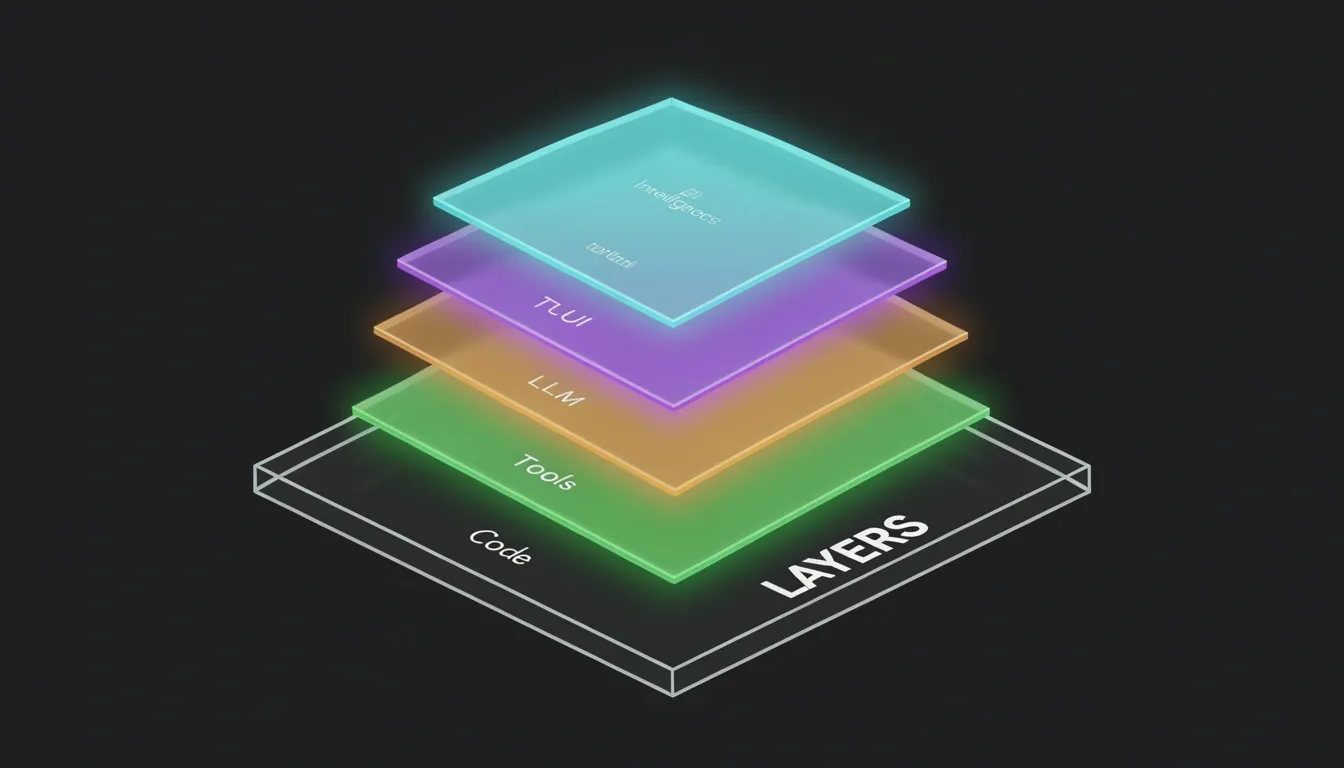
Architecture: The Four-Layer Design That Makes It Tick
When I first mapped out Crush's internals, the strict separation of concerns immediately caught my attention. The codebase is split into four discrete modules, and this design choice isn't just architectural theater—it directly impacts how quickly you can pivot between models or extend the agent's capabilities without destabilizing the terminal interface.
The Terminal Application (TUI) sits at the top, built on Charmbracelet's Bubble Tea framework. This isn't just a pretty wrapper; it's the interactive shell where you type commands and watch the agent stream responses. Because it's isolated from the logic layers beneath it, the TUI team can iterate on keybindings, viewport rendering, and input buffers without worrying about whether Anthropic's API changed its streaming format.
Beneath that sits the LLM Integration Layer, which I consider the real backbone of the system. This module normalizes access across a wide range of providers through a single common interface. When I look at the supported protocols, the list is extensive:
- OpenAI-compatible APIs
- Anthropic APIs
- Gemini
- Amazon Bedrock
- Google Vertex AI
- Azure OpenAI
This layer handles the messy details—streaming responses, token counting, cost tracking, and model capabilities detection—so the rest of the application doesn't have to. Capabilities like reasoning support and attachment handling are detected dynamically, and the kicker is that switching providers requires zero application-level changes. If you move from OpenAI to Bedrock, the TUI and Tools System don't even flinch.
The Tools System and Its Built-In Primitives
The Tools System is where Crush stops being a chatbot and starts acting like a software engineer. It's an extensible framework shipping with concrete primitives that the LLM can invoke directly:
- View – inspect file contents
- Edit – modify existing files
- Write – create new files
- Bash – execute shell commands
- LSP – query language-server intelligence
- grep – search across the codebase
- ls – list directory contents
There's also a proposed crush.switch_model tool that hints at future meta-cognitive behavior—imagine the agent deciding mid-session that it needs a cheaper or smarter model for a specific subtask. Because the framework is extensible, adding custom tooling doesn't require recompiling the TUI or rewriting provider logic.
LSP-Derived Code Intelligence
The Code Intelligence Layer is the fourth module, and it's what prevents Crush from operating blind. Instead of regex-guessing its way through your codebase, it hooks into Language Server Protocol (LSP) integrations to pull definitions, references, and type information. When I see an agent that can accurately refactor a method across multiple files, it's usually because something at this layer is feeding the LLM precise structural context rather than raw text.
Provider Configuration and Cost Tracking
Where Crush gets really opinionated is in its provider configuration schema. Everything is defined in JSON, with two primary protocol families: OpenAI-compatible and Anthropic-compatible.
For OpenAI-compatible providers, the type field distinguishes between direct OpenAI usage (openai) and third-party endpoints (openai-compat). That openai-compat flag is what lets you plug in Deepseek, Groq, or local models running through Ollama or LM Studio without forking the codebase. Every provider block requires:
base_url– the endpoint addressapi_key– supports environment variable expansionmodelsarray – specifying model IDs, names, context windows, and default max tokens
Inside that models array, Crush tracks per-token costs for input and output, split between cached and uncached rates. That's a level of financial transparency I don't see in many coding agents.
Anthropic-compatible providers use the anthropic type and expose fields like can_reason and supports_attachments, which the LLM Integration Layer reads to adjust its behavior dynamically.
Configuration Priority and Session Persistence
I also appreciate how Crush handles config precedence. It searches for settings in this exact order:
.crush.jsonin the current working directorycrush.jsonin the current working directory- Global configuration
This means you can drop a project-specific provider file into a repo and override your defaults without touching your system-wide setup.
Session data lands in $HOME/.local/share/crush/crush.json on Unix or %LOCALAPPDATA%\crush\crush.json on Windows. That's a clean, XDG-compliant path on Linux and macOS, and a standard Windows localappdata location, keeping ephemeral conversation state out of your source directories.
Dual-Agent Model Routing: The Cost Optimization Breakthrough
I noticed that the most impactful architectural shift in Crush v0.7.2 wasn't a new UI component or syntax parser, but rather a fundamental rethink of how inference costs scale with agent complexity. Issue #427 laid the problem bare: firing a single large language model at every operation—whether it's a complex refactoring job or a simple query like "find where this is implemented"—is economically inefficient. Competitors like Claude Code had already demonstrated that splitting workloads between model sizes unlocks massive savings, and PR #914 finally brought that same intelligence to Crush's dual-agent architecture.
The implementation is straightforward but architecturally significant. Crush now exposes two distinct top-level agents: a coder agent that handles direct code modifications, and a task agent reserved for open-ended, research-oriented operations like "find how this works" or tracing internal mechanics. Administrators map each agent to a specific model via crush.json. By default, the coder agent sticks to the user's selected large model—think Claude Sonnet 4—while the task agent drops down to a smaller, cheaper alternative like Claude Haiku 3.5. This isn't just a minor configuration tweak; it's an 80-90% cost reduction for suitable workloads. When I look at the pricing, the gap is staggering: Haiku 3.5 costs roughly $0.25 per million input tokens and $1.25 per million output tokens, whereas Sonnet 4 runs $3.00 input and $15.00 output. For research tasks that don't require deep reasoning—locating definitions, mapping imports, or answering structural questions—that price differential is impossible to ignore.
Transparency and the Prompting Gap
What I appreciate about PR #914 is that it didn't stop at backend routing. The Crush sidebar and splash screens now visually indicate which model each agent is currently using. This gives developers immediate transparency into where their token budget is going, which is critical when you're trying to optimize costs across a team. There's no guesswork about whether that last query burned through expensive Sonnet tokens or stayed safely within Haiku's cheaper context window.
That said, the real-world rollout has exposed a subtle but important limitation. Feedback after the merge suggests the task agent is still underutilized when paired with Anthropic models, specifically because prompt differences between the two agents aren't fully optimized yet. The small model has the capacity to handle more routine work, but the prompting strategy hasn't been refined enough to consistently hand off those tasks from the large model. To me, this feels like the next logical frontier: the architecture is sound, the cost math is undeniable, but the agent orchestration logic needs tighter prompt engineering to maximize small model utilization without sacrificing output quality. If the Crush team can close that gap, this dual-agent setup won't just be a cost optimization—it will become the default pattern for how AI coding agents should manage model selection.
Session Context Preservation and BYOK Authentication
I see the session-based workflow architecture as the backbone that makes Crush's multi-model strategy actually usable in production. When I switch models mid-session—whether through the TUI or programmatically—the platform doesn't dump my conversation history or discard the LSP-derived code intelligence I've built up. That state sticks around. This means I can route architecture exploration to a heavy reasoning model without burning tokens, then immediately flip to a fast, cheap model for surgical code edits, all within the same continuous conversation. There's no manual export of chat history, no context window reconstruction, and no friction.
How Session Context Survives Model Switches
- LSP-derived code intelligence: The local language server protocol data remains attached to the session, so the new model inherits the project's semantic understanding immediately.
- Conversation history retention: Prior exchanges stay in-context, eliminating the need to re-explain requirements when handing off between models.
- Workflow continuity: The transition happens inside the same session boundary, so file buffers, working directory state, and tool outputs remain intact.
BYOK Authentication and Air-Gapped Flexibility
Crush handles authentication through a BYOK model that keeps API keys in my local configuration rather than on Crush's infrastructure. I appreciate this because it lets me keep my direct commercial relationship with providers like OpenAI or Anthropic, and I retain granular control over rate limits and spending without a middleman gatekeeping access.
For environments that can't hit external repositories, Crush pulls its provider auto-update data from the community-maintained Catwalk repo. I can disable this entirely for air-gapped deployments by setting disable_provider_auto_update to true in crush.json, or by exporting CRUSH_DISABLE_PROVIDER_AUTO_UPDATE. That gives operations teams a clean, configuration-driven way to freeze provider definitions without patching binaries.
The crush.switch_model Tool Architecture
Issue #859 proposes crush.switch_model, a tool that would let agents programmatically swap the active provider and model mid-session while keeping that preserved context intact. The interface is deliberately minimal: it accepts a JSON payload with provider and model strings, and returns a structured response containing:
ok: A boolean indicating success or failure.old: The previous provider/model state for rollback verification.new: The confirmed post-switch state.warning/error: Optional diagnostic strings when a switch partially fails or violates policy.
Every call generates an audit log entry through Crush's existing tool permission system. The tool reuses local switching logic, which means it introduces zero new network surface area—a detail I always look for when evaluating agent-side tooling.
Permission Boundaries and Enterprise Cost Control
The proposed tool inherits Crush's current permission model, so it triggers an explicit user approval prompt by default. I can bypass this with the --yolo flag during local development, but in production CI pipelines or shared environments, that gate matters.
From an enterprise perspective, this opens up policy enforcement at the tool level. An admin could configure crush.switch_model to block transitions to prohibitively expensive models—think GPT-4 class inference on large batches—or enforce tiered access based on project budgets. Post-switch usage tracking attaches directly to the audit trail, giving finance teams concrete data for budget adherence without having to reconcile invoices across multiple provider dashboards.
The Skills System: Extensibility Through Agent Skills Standard
Crush approaches extensibility through the Agent Skills open standard, and I find the implementation particularly elegant because it treats capabilities as portable, discoverable packages rather than hardcoded features. Each skill is essentially a folder containing a SKILL.md file that Crush can dynamically discover and activate. This design prioritizes reusability and cross-project portability—you're not just configuring a tool, you're packaging domain knowledge into shareable units that any compatible agent can consume.
How Skill Discovery Works in Practice
The discovery mechanism follows a strict priority hierarchy that strikes a sensible balance between convention and configuration. When Crush needs to resolve a skill, it checks sources in this exact order:
- Built-in skills — These are embedded directly into the binary using Go's
embedpackage, meaning they ship with the executable itself. Thecrush-configskill is the prime example here, providing self-configuration capabilities without any external files. - Default directories — On Unix systems, Crush automatically scans
~/.config/crush/skills/and~/.config/agents/skills/. Windows users get equivalent paths at%LOCALAPPDATA%\crush\skills\and%LOCALAPPDATA%\agents\skills\. The tool also checks cross-platform project-relative directories including.agents/skills,.crush/skills,.claude/skills, and.cursor/skills. - Configured paths — You can explicitly define additional locations through the
options.skills_pathsarray incrush.json. - Environment override — The
CRUSH_SKILLS_DIRvariable overrides all defaults, which is exactly what I'd expect for containerized or CI environments where standard home directories might not apply.
The crush-config Skill as a Reference Architecture
The built-in crush-config skill demonstrates how comprehensive a single skill package can be. When activated, it guides users through:
- Configuration file priority — Understanding which settings take precedence when multiple config sources exist.
- Provider setup — Wiring up models like DeepSeek through an OpenAI-compatible API interface.
- LSP configuration — Setting up language servers including gopls for Go and typescript-language-server for TypeScript.
- MCP server integration — Connecting filesystem and GitHub servers with support for both stdio and http transport types.
- Tool permissions — Explicitly allowing specific tools such as
view,ls,grep, andeditthrough theallowed_toolsfield. - Skill management — Configuring
skills_pathsanddisabled_skillsto fine-tune the agent's available capabilities. - Environment variables — Exposing
CRUSH_GLOBAL_CONFIG,CRUSH_GLOBAL_DATA, andCRUSH_SKILLS_DIRfor runtime flexibility. - Attribution settings — Managing
assisted-byandco-authored-bymetadata for proper version control attribution.
On-Demand Loading and Built-in Immutability
What stands out to me is how Crush loads these skills strictly when needed through the View tool, which bypasses normal permission prompts and handles files up to 1,000,000 lines within discovered skill directories. This means the agent isn't bloating its context window with unused capabilities at startup.
Built-in skills carry specific architectural advantages that I consider significant for production use. They are immediately available without installation steps, immutable so they can't be accidentally modified or deleted, and version-locked to guarantee compatibility with the current binary. From a security standpoint, this reduces the attack surface since embedded skills don't rely on external filesystem lookups, and access is measurably faster because there's no directory traversal overhead.
Performance Benchmarks: Speed vs. Code Quality Tradeoffs
When I look at the benchmark results for Crush CLI, the clock stops at roughly 1.5 minutes for a complete Todo app. That makes it the second-fastest agentic coding tool in the comparison, and my immediate concern was whether that velocity came at the expense of maintainable code. After reviewing the output, I think the core logic holds up well, though the tradeoffs surface quickly once you inspect the user experience and the underlying architecture.
Code Generation Under Pressure
The generated output is clean and production-ready. I specifically noticed:
- Readable state management: The variables
todosandnewTodoare descriptive. Crush avoided vague placeholders likedataorlist, which makes the component immediately understandable. - Clear function boundaries: The handlers
addTodo,toggleComplete, anddeleteTodoare structured with straightforward event-driven logic. There is no unnecessary abstraction or over-engineering. - Tailwind specificity: The styling uses precise utility classes, including
shadow appearance-noneandfocus:shadow-outlinefor inputs. The delete button appliesbg-red-500 hover:bg-red-700, showing the model understood utility-first visual feedback. - Pragmatic ID strategy: Using
Date.now()with anumbertype keeps the demo lightweight without pulling in external UUID libraries.
Overall, the syntax is concise and the logic is sound. The 90-second turnaround did not result in sloppy code.
UX Gaps That Separate Good from Great
Speed and clean syntax do not automatically translate to polished user experience. I found two specific limitations that placed Crush behind Qwen and Codex CLI in final output quality:
- Broken Enter key submission: The interface does not allow users to press Enter to submit a new todo item. This forces an exclusively mouse-driven submission flow, which feels broken to anyone accustomed to standard web forms.
- Missing checkbox semantics: Instead of rendering a proper checkbox input, Crush attached the completion handler directly to a text span via
onClick={() => toggleComplete(todo.id)}. From an accessibility standpoint, this is a significant regression. Users expect a checkbox; assistive technologies expect a checkbox; and a<span>element provides neither keyboard operability nor correct ARIA semantics.
These gaps suggest that while Crush understands React state logic, it occasionally misses the interaction design layer that separates functional prototypes from genuinely usable applications.
Dual-Agent Routing Realities
There is also a structural limitation hiding behind the architecture. Crush uses a big/small model routing system intended to save costs by delegating simpler tasks to a lighter task agent. In practice, I found that this task agent was underutilized when paired with Anthropic models. The issue stems from prompt differences: Anthropic's model pairings handle task distribution differently than other providers, which means the cost-saving potential of the routing layer was not fully realized during my testing. This is a frustrating inefficiency because the architecture promises smarter resource allocation, yet the prompts have not been tuned to trigger the smaller agent consistently when Anthropic handles the heavy lifting.
So where does this leave us? Crush CLI delivers genuinely fast, readable code. The 1.5-minute turnaround produced a clean Todo app with sensible Tailwind styling and clear function boundaries. But the generated UX has rough edges—specifically around form interaction patterns—that kept it out of the top tier. Meanwhile, the dual-agent routing, which should be a major efficiency win, remains partially dormant with Anthropic due to prompt-level friction. For me, that defines Crush's current position: it is a rapid, competent code generator, but the agentic orchestration and the final user experience still need manual refinement.
Honest Pros: What Crush Genuinely Gets Right
Crush stands out immediately because it treats model providers as interchangeable infrastructure rather than locked-in vendors. I can switch between OpenAI, Anthropic, Gemini, Amazon Bedrock, Google Vertex AI, Azure OpenAI, and OpenAI-compatible endpoints like Deepseek, Groq, or Ollama/LM Studio without touching application code. That flexibility is rare. Most agents force you to reconfigure everything when you change backends, but Crush abstracts this behind a unified interface.
Cost Optimization and Session Integrity
Where Crush gets genuinely clever is its dual-agent architecture. The tool splits work between a coder agent and a task agent, routing high-frequency, low-complexity operations to smaller models. In practice, this drives an 80-90% cost reduction. The math is straightforward:
- Claude Haiku 3.5 costs $0.25 per million input tokens
- Claude Sonnet 4 costs $3.00 per million input tokens
Offloading boilerplate to Haiku while reserving Sonnet for heavy lifting keeps budgets sane without dumbing down the output.
Switching models mid-session usually destroys context. Crush avoids this by preserving both conversation history and LSP-derived code intelligence across model changes. I don't lose my place when I swap from GPT-4o to a local Ollama instance. For enterprise teams, the BYOK (Bring Your Own Key) setup is equally practical. Organizations keep their direct commercial relationships with providers, manage their own rate limits, and retain full visibility into spending.
Real-Time Code Intelligence and Extensibility
The LSP integration is not just marketing. Crush hooks into actual language servers like gopls for Go and typescript-language-server for TypeScript, pulling definitions, references, and type information directly into the agent's context. That means the suggestions are grounded in the actual codebase structure, not just pattern matching.
Extensibility follows a clean standard. The Agent Skills system supports on-demand loading with a portable format that works across projects and teams. I particularly like the crush-config skill, which lets the agent help configure its own capabilities, creating a tight feedback loop. Add in MCP server support for filesystem and GitHub operations over both stdio and http transports, and Crush starts feeling less like a standalone tool and more like a hub.
Speed, Interface, and Granular Control
Performance benchmarks back up the experience. Crush generated a complete Todo app in roughly 1.5 minutes, making it the second-fastest agent in the comparison set. The interface itself is built on Charmbracelet's Bubble Tea framework and Charm libraries, so the TUI is colorful, responsive, and genuinely pleasant to stare at during long sessions.
Control matters too. The tool offers fine-grained permissions over individual operations:
- Allow or block view, ls, grep, and edit
- Disable built-in tools entirely if they conflict with internal policies
Finally, the cross-platform support is refreshingly honest: it runs natively on Windows without demanding WSL workarounds.

Honest Cons: Where Crush Still Falls Short
When I look at the benchmark results for generated UI code, Crush clearly trails Qwen and the Codex CLI on basic interaction patterns. The agent produced forms that lacked Enter key support for submission, forcing users away from standard keyboard workflows. It also relied on text-span click handlers instead of proper checkbox toggles for completion states. These are not minor styling issues; they reveal a blind spot in how the model reasons about accessible input semantics.
Where the Agent Architecture Stalls
- Task agent underutilization with Anthropic models: Because of prompt compatibility differences, the small task agent is underutilized when paired with Anthropic models. I see this as a direct hit to the dual-agent value proposition, since the advertised 80–90% cost savings from intelligent routing largely evaporates in those configurations.
- Missing programmatic model switching: The proposed
crush.switch_modeltool tracked under Issue #859 remains unshipped. Without programmatic model switching, agents cannot automatically classify task complexity and route requests to the appropriate model tier. Users must manually intervene or restart sessions to change models, which breaks the autonomous workflow the architecture is meant to enable.
Setting up Crush across multiple providers demands more than pasting in an API key. The JSON configuration requires explicit provider types—openai, openai-compat, or anthropic—plus base URLs, API keys with environment variable expansion, and per-model arrays defining context windows, max tokens, and per-token costs. For engineers coming from single-provider tools, this is a steep learning curve, and one misconfigured cost parameter can immediately skew budgeting.
External Dependencies and Documentation Debt
- Provider auto-update dependency: Crush depends on the community-maintained Catwalk repository for provider updates. While you can disable auto-updates for air-gapped environments, default installations tie core functionality to external maintenance cycles.
- Heritage confusion: The transition from the archived OpenCode Go codebase creates real friction. Older documentation and search results still reference the Go implementation, and I find that new users hunting for answers often land on obsolete code that does not match Crush's current behavior.
Cost Transparency Gaps
- No native cost dashboard: Because Crush runs on a BYOK (Bring Your Own Key) model, it offers no built-in cost dashboard. The only spend hints appear in sidebar and splash screen model indicators, which is a far cry from comprehensive analytics.
- Pricing opacity across providers: Users must manually reconcile usage across multiple provider dashboards to understand their true burn rate. For teams running this at scale, the lack of centralized spend tracking introduces operational overhead that rivals the configuration complexity itself.